Noerden: Reach your health goals & live better with connected devices.
Project
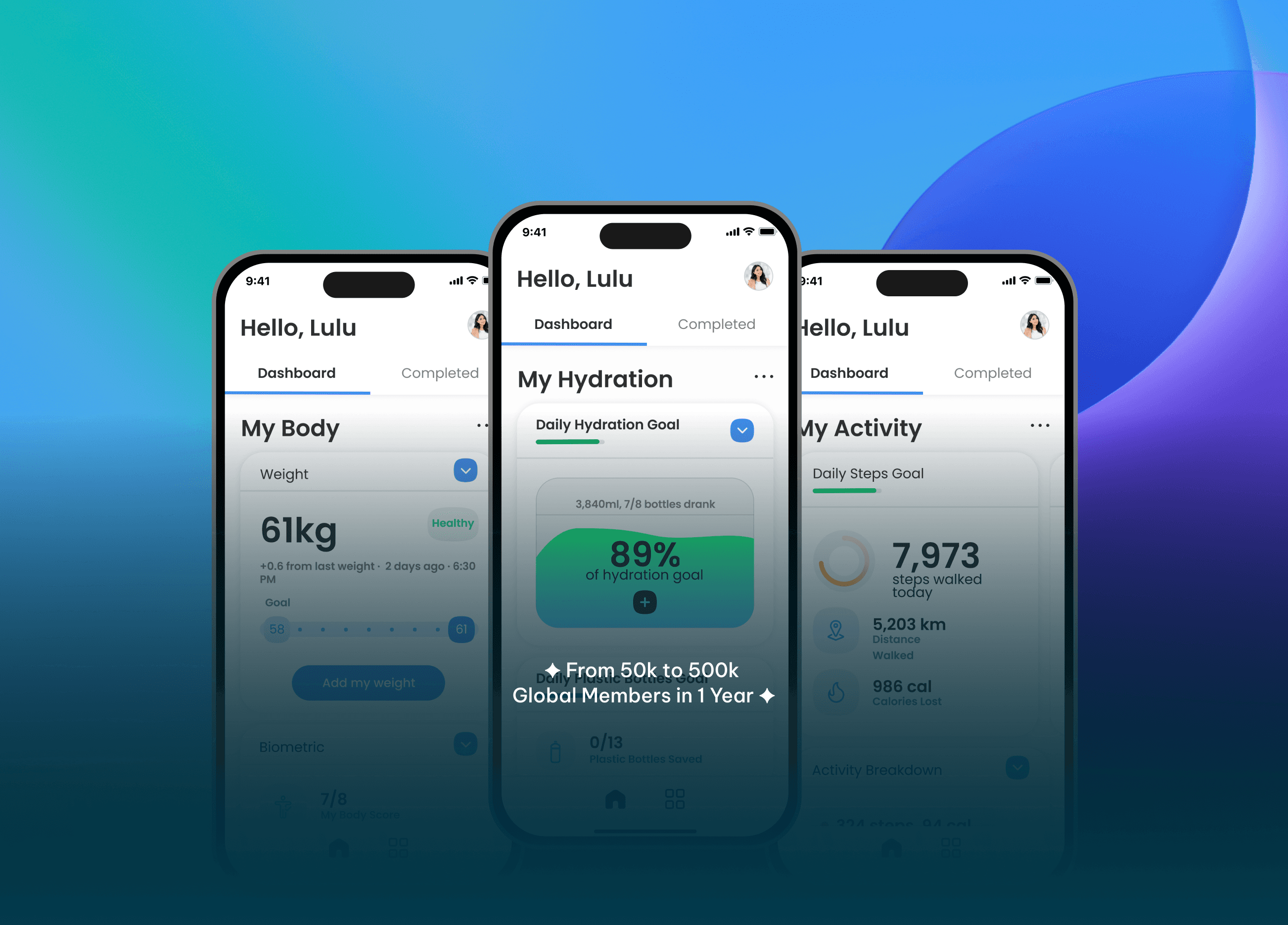
Noerden is your all-in-one app that empowers you to take control of your health and achieve your wellness goals. It seamlessly connects with your Noerden smart devices (smart scales, smart bottles, hybrid smartwatches) to provide a complete picture of your body's data.
Noerden gained over 500k global (from 50k) users in just a year by improving UX using the existing data.
Industry
Consumer Electronics, Health
Service
Native App Design, UX Research, Web Design, Coaching, UI Testing
Tools
Framework
By adopting Agile methodology, Noerden can be developed iteratively, ensuring the app meets the needs of users and trainers, ultimately leading to a successful health platform.
The Process
Define the Problem
Our sales data shows a significant gap between smart device purchases and app usage.
Customer reviews praise the devices, but criticise the app's functionality and user experience.
Low app engagement is hindering long-term user retention and satisfaction.
Sales of devices may deteriorate if app’s reviews are bad because the app is the only platform for users to consume the data from the smart devices.
Conduct Research
Identify Common Themes: Look for recurring complaints or areas of frustration mentioned in negative app reviews.
Consider Positive Reviews: While focusing on negativity, don't overlook positive reviews. They might highlight features users appreciate and functionalities that should be retained.
Target Audience: Existing smart device owners who haven't downloaded or actively use the app, New smart device owners seeking a positive first impression of the app.
Ideate & Conceptualise
Increase app usage and engagement to match smart device sales.
Improve app functionality to address user pain points and provide a seamless user experience.
Enhance user satisfaction through intuitive design and clear guidance.
Prototype & Development
Usability: The app should be intuitive and easy to navigate.
Functionality: Core functionalities should work smoothly and reliably.
Value Proposition: Users should understand how the app enhances their smart device experience.
Customisation: To cater to individual user preferences.
Engagement: The app should offer features that encourage continued use and interaction.
Testing & Evaluation
Develop a low-fidelity prototype to test functionalities.
Conduct user testing Observe user interactions and behaviour.
Gather feedback to iterate on the design.
Develop a high-fidelity design with newly enhanced UX to test on target audience.
Prioritised list of app feature improvements: This specifies bug fixes, usability enhancements, and new features.
Iteration & Refinement
Onboarding and user guidance plan: This outlines strategies for educating new and existing users.
Ensure the app is accessible to users with disabilities.
Maintain consistent branding between the app and smart device experience.
Continuously iterate and improve the product
Old App Design
Target Research: Existing Users
Functionality
Bugs and glitches: The app might crash, freeze, or have functionalities that don't work as intended.
Complexity: The core features might be difficult to understand or use, leading to frustration.
Missing features: The app might lack functionalities users expect from a companion app for their smart device.
User Experience (UX)
Unintuitive interface: The app's layout and navigation might be confusing or difficult to learn.
Lack of onboarding: New users might be thrown into the app without clear instructions on how to use it effectively.
Poor information architecture: Finding specific settings or information within the app might be time-consuming or challenging
Engagement
Limited value proposition: Users might not understand how the app enhances their smart device experience and may not see a reason to use it regularly.
Lack of personalisation: The app might offer a one-size-fits-all experience, failing to cater to individual user preferences.
Absence of engaging features: There might be a lack of features that keep users coming back to the app, leading to disengagement.
Target Research: New Users
Onboarding and Setup
Confusing setup process: The initial setup and connection between the app and smart device might be complex or unclear.
Lack of clear instructions: New users might be left without proper guidance on how to use the app's features effectively.
Technical difficulties during setup: Bluetooth pairing issues, Wi-Fi connection problems, or other technical hurdles could prevent a smooth setup experience.
Understanding App Value
Unclear value proposition: New users might not immediately grasp how the app enhances their smart device experience and its overall benefits.
Limited in-app tutorials: The app might lack sufficient tutorials or explainer videos to guide users through core functionalities.
Unrealistic expectations: Marketing materials or product descriptions might oversell the app's capabilities, leading to disappointment upon initial use.
General User Experience (UX) Pain Points
Unintuitive interface: Just like existing users, a confusing layout and navigation can make it difficult for new users to learn and explore the app.
Hidden features: Important functionalities might be buried within menus or settings, making them difficult to discover.
Lack of personalisation: The app might not offer options for customisation, hindering new users from tailoring the experience to their preferences.
Persona

Name
Camille
Target Type
Existing User
About
Age: 32
Occupation: Marketing Manager at a Tech Startup
Location: Paris, France
Device: iPhone 13
Quotes
"My body is a machine, and I need the right data to fine-tune it."
"Most fitness apps are too generic - I need insights specific to my training goals."
"Seamless integration with my existing wearables is crucial."
Psychographics
Motivations: Wants to improve her overall health and well-being. Seeks to understand her body better and make data-driven decisions about her health habits.
Values: Balance, convenience, and accuracy.
Personality:
Proactive, goal-oriented, and tech-savvy.Limited body awareness:
Camille feels disconnected from her body and doesn't have a clear picture of her daily activity levels or hydration habits.Information overload: Struggles to find reliable and trustworthy health information online.
Unstructured approach to health: Doesn't have a structured plan to improve her health and relies on guesswork or sporadic efforts.
Needs
Simple and user-friendly app: Needs an app that is easy to use and understand, even for someone who isn't super tech-savvy.
Holistic view of health data: Wants to see all her health data (weight, steps, hydration) in one place for a comprehensive picture.
Actionable insights and recommendations: Needs guidance on interpreting her data and making positive changes to her health habits.
Motivation and support: Seeks encouragement and support to stay on track with her health goals.
Frustrations
Inaccurate data: Concerned about the accuracy of health data collected by some wearables and apps.
Confusing health information: Feels overwhelmed by the sheer amount of conflicting health advice available online.
Lack of personalized guidance: Disappointed by generic health recommendations that don't consider her individual needs and goals.
How to Help
Easy-to-use interface: Tracks weight, steps, and hydration with clear data visualisation.
Centralised dashboard: Offers a holistic view of her health data in one place.
Personalised insights and coaching: Analyses her data and provides tailored recommendations for improvement.
Actionable tips and challenges: Suggests practical steps to improve health habits and offers motivational challenges.
Solution
New features using existing data to have a personalised user experience
Increased Relevance and Personalization: By analyzing user data, Noerden can develop features that cater to individual needs and preferences. This can lead to a more relevant and engaging experience for users, making them feel valued and understood.
Improved Efficiency and Productivity: Features that leverage user data can automate tasks or suggest actions that save users time and effort. This can streamline the user journey and make it more efficient, leading to greater satisfaction.
Anticipation of Needs: Advanced data analysis can predict user needs and present features or suggestions before users even know they need them. This proactive approach can be highly satisfying for users, as it feels like the product is "thinking" for them.
A Feeling of Control: Some features based on user data can give users more control over their experience. For example, customization options based on preferences can empower users and make them feel like they have a stake in shaping their experience.
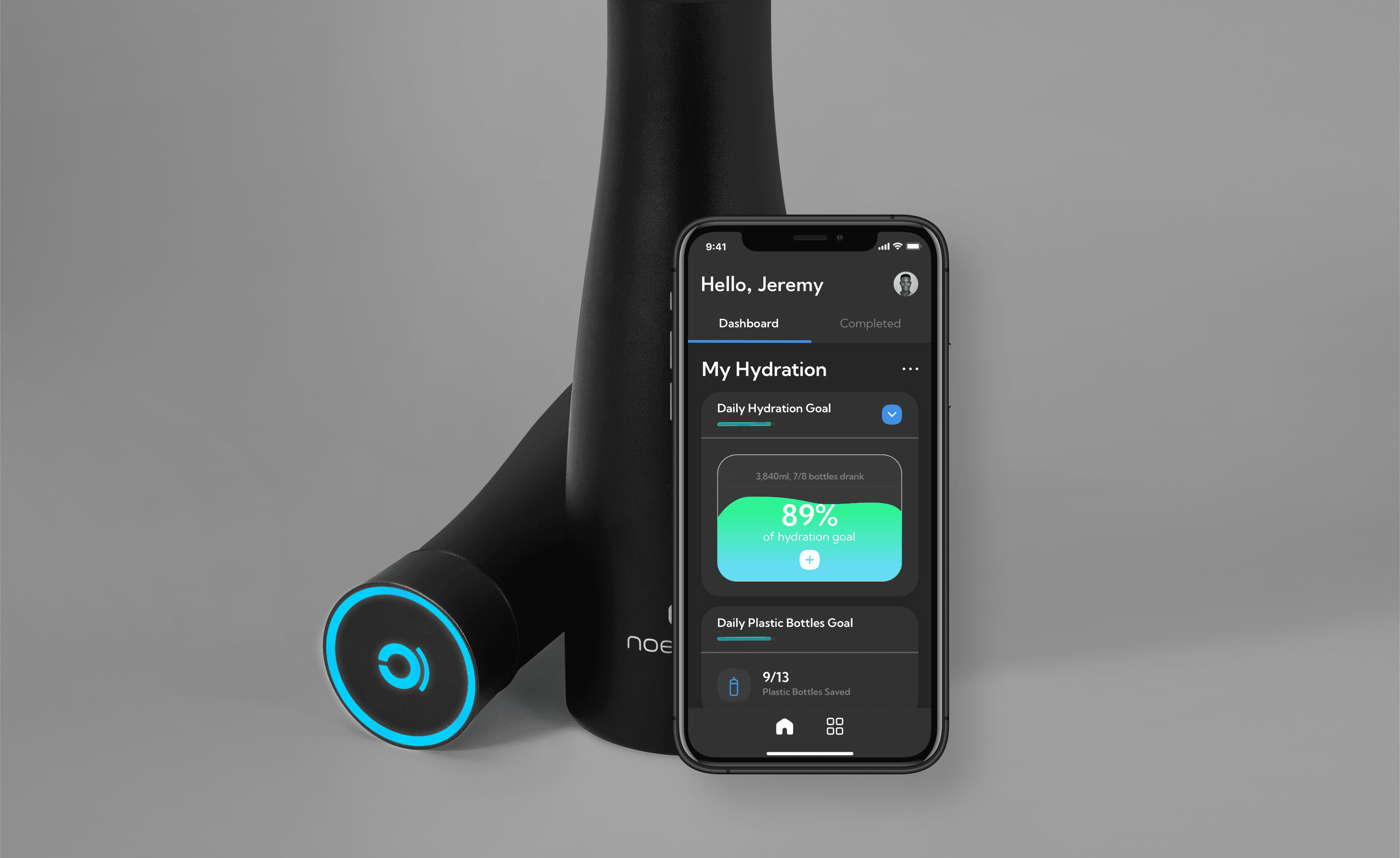
Connected Smart Devices: Effortlessly sync your Noerden smart devices with the app for automatic data collection.
Personalised Health Dashboard: See all your biometrics (weight, body composition, hydration) and activity levels (steps, distance, calories burned) in one central location.
Data Visualisation: Track your progress over time with insightful charts and graphs to monitor trends and celebrate achievements.
Insight & Guidance
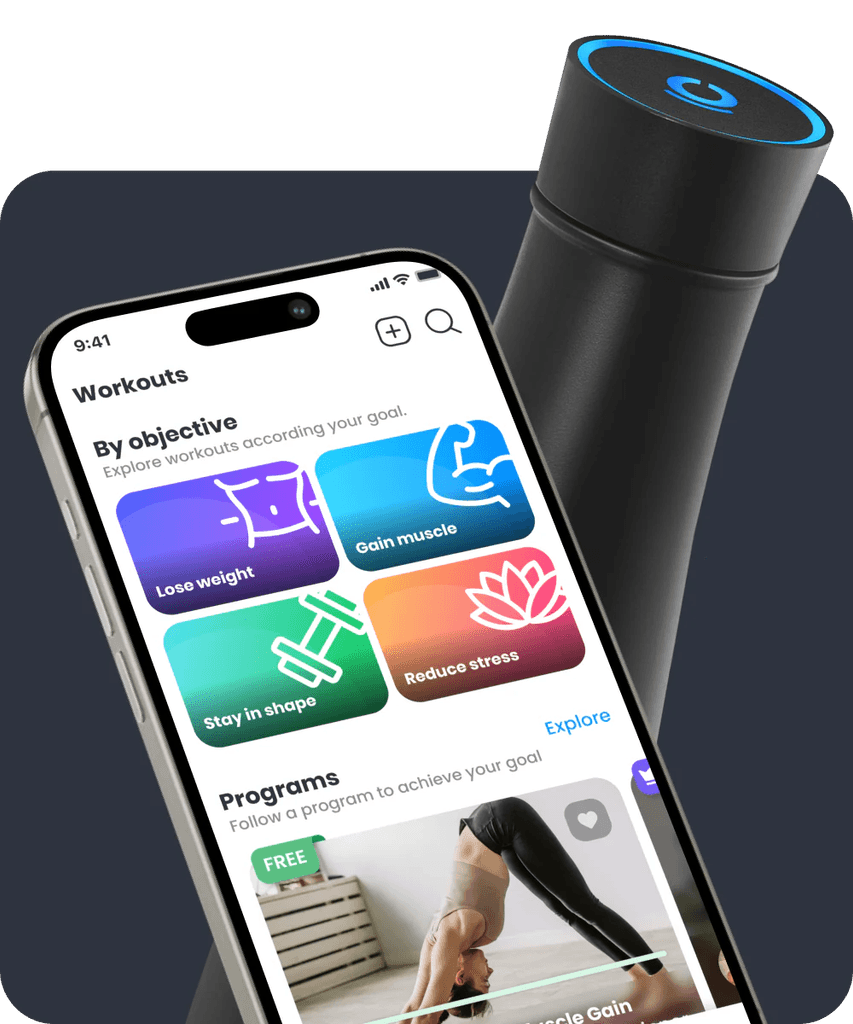
Smart Coaching: Noerden's advanced algorithms analyse your data and offer personalised recommendations based on your goals.
Weight Loss: Receive tailored meal plans, exercise tips, and motivational tips to reach your weight loss goals.
Muscle Building: Get custom workout routines, nutrition advice, and progress tracking to optimise muscle growth.
Improved Sleep: Noerden analyses your sleep patterns and recommends adjustments to your sleep hygiene for better quality rest.
Staying Motivated
Goal Setting: Set achievable and specific goals to keep you focused and motivated.
Progress Tracking: Visually track your progress through charts and graphs to celebrate your achievements.
Daily Reminders: Receive personalized reminders to stay on top of your hydration goals, weigh-ins, or exercise routines.
Social Fitness App: Connect with friends using the Noerden social fitness app to share your progress, participate in friendly challenges, and stay motivated together.
Seamless User Experience
Simple and Intuitive Interface: Navigate the app effortlessly with a user-friendly design.
Cross-Device Compatibility: Access your Noerden app and data from your smartphone, smart watch or tablet for ultimate convenience.
Compatible with Apple Health & Google Health: Get a holistic view of your health by combining data.
Data Security: Noerden prioritises data security. Your health information is encrypted and stored securely using industry-standard practices.
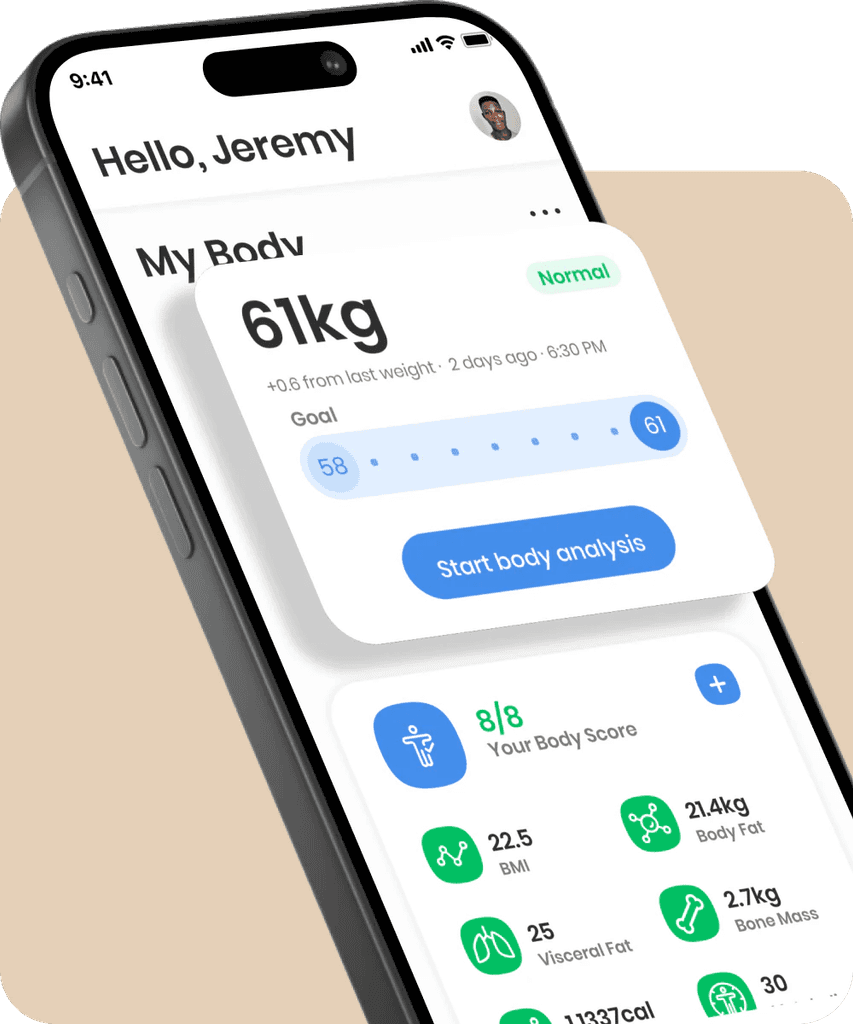
Body Composition, Hydration and Steps Tracking
Goal Setting: Based on body composition analysis, help users set realistic and achievable goals related to weight loss, muscle gain, or body fat reduction.
Personalised Coaching: Provide tailored recommendations on nutrition, exercise routines, and lifestyle habits based on individual body composition and goals.
Water Intake Logging: Allow users to easily log their water intake throughout the day, with options for different sized water bottles or glasses.
Customisable Goals: Set personalised daily hydration goals based on factors like weight, activity level, and climate.
Hydration Reminders: Receive personalised reminders on app and on the bottle to drink water throughout the day.
Data Collection:
Automatic Tracking: Integrate with wearable devices (smartwatches, Apple Health) for automatic step counting throughout the day.
No Manual Entry: Sync with Apple Health so no need to input steps if they don't use a wearable device.
New App Design